Title: Desktop Mode
Author: Daniel López Sánchez
Published: 7 Maggu 2026
Last modified: 11 Maggu 2026
---
Search plugins
# Desktop Mode
By [Daniel López Sánchez](https://profiles.wordpress.org/allterraindeveloper/)
[Download](https://downloads.wordpress.org/plugin/desktop-mode.0.8.2.zip)
* [Details](https://kab.wordpress.org/plugins/desktop-mode/#description)
* [Reviews](https://kab.wordpress.org/plugins/desktop-mode/#reviews)
* [Installation](https://kab.wordpress.org/plugins/desktop-mode/#installation)
* [Development](https://kab.wordpress.org/plugins/desktop-mode/#developers)
[Support](https://wordpress.org/support/plugin/desktop-mode/)
## Description
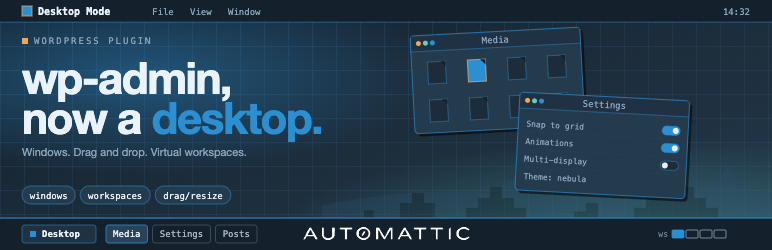
Desktop Mode renders /wp-admin as a desktop operating system. Admin screens open
as draggable, resizable, minimizable windows on a desktop, with a left-edge dock
built from the admin menu. The classic admin stays untouched for everyone else,
and deactivating the plugin restores vanilla Core exactly.
Built and maintained by [Automattic](https://automattic.com) — the company behind
WordPress.com, Jetpack, WooCommerce, and Tumblr. Zero Core patches: every feature
is wired through public WordPress hooks.
#### Highlights
* **Per-user opt-in.** An admin-bar toggle flips a user-meta flag; nobody else
sees any change.
* **Window system.** Iframe windows load admin pages chromelessly. Native windows
render directly in the parent DOM via a public registration API. Both share drag,
resize, minimize, maximize, fullscreen, and detach-to-new-tab.
* **Dock + taskbar.** Left-edge dock for core menus; bottom macOS-style pill taskbar
for plugin menus. Letter-badge icon fallback for plugins without icon art.
* **Virtual desktops (« Spaces »).** Multiple desktops per user, each with its
own window set. Overview grid surfaces the Spaces switcher and thumbnails.
* **Arrange & snap.** Cascade, Tile, Overview, Snap-to-grid. Plugins contribute
custom entries.
* **Wallpaper & widget registries.** Server- and client-side registration. CSS
presets plus canvas (WebGL/2D) wallpapers with collision-aware surface data for
snow/rain/physics effects.
* **Desktop icons.** Wallpaper-layer shortcuts that open native windows or admin
URLs.
* **AI Copilot (optional).** Cmd+K palette backed by an agentic loop with built-
in search tools. Disabled until you supply an API key. See « External services»
below.
* **Slash commands & palettes.** Public registration APIs for plugin authors.
* **Cross-frame drag bridge.** Media-library attachments drag across iframe boundaries.
* **Session persistence.** Window stack (including desktops, focus, state) restored
across reloads.
* **i18n.** Full gettext coverage across PHP and TypeScript; Spanish translation
shipped.
#### For plugin authors
Desktop Mode is built to be extended. Every significant behavior is hookable — add
a desktop icon, register a dock item, gate desktop mode by role, react to window
events, or register a native window, all from your own plugin with zero patches
here.
Comprehensive PHP and JavaScript hook surface, plus stable `desktop_mode_register_*`
functions for windows, widgets, wallpapers, icons, window tabs, commands, settings
tabs, and AI tools. See the [developer docs on GitHub](https://github.com/WordPress/desktop-mode/tree/trunk/docs).
#### External services
This plugin’s optional **AI Copilot** sends data to **OpenAI** (`https://api.openai.
com/v1/responses`) when, and only when, an administrator configures an OpenAI API
key in **Settings AI**. With no key configured, no external requests are made.
When the AI Copilot is enabled and a user invokes it (via Cmd+K or the slash-command
palette):
* **What is sent:** the user’s prompt, the conversation history for the active
session, the chosen model identifier (e.g. `gpt-4o-mini`), and tool-call metadata.
The plugin’s built-in tools (`search_posts`, `search_pages`, `search_comments`)
may include excerpts of the matching posts/pages/comments in tool results, which
are then sent back to OpenAI as part of the agentic loop.
* **When it is sent:** on user-initiated AI requests, and (if enabled) on `save_post`,
term-save, and comment-save hooks for auto-analysis. Auto-analysis runs server-
side as part of the post-save flow.
* **Why it is sent:** to obtain model completions and tool-call decisions that
drive the AI Copilot.
* **Who provides the service:** OpenAI, L.L.C. — see the [OpenAI Terms of Use](https://openai.com/policies/row-terms-of-use/)
and the [OpenAI Privacy Policy](https://openai.com/policies/row-privacy-policy/).
The AI Copilot’s provider layer is also extensible: third-party plugins may register
additional providers via `desktop_mode_register_ai_provider()`. Those providers
may send data to other endpoints; review each plugin’s own privacy disclosure separately.
No other external services are contacted by this plugin.
### Credits
Desktop Mode is brought to you by [Automattic](https://automattic.com). The plugin
is open source under GPLv2-or-later; contributions are welcome on [GitHub](https://github.com/WordPress/desktop-mode).
#### Third-party libraries
The plugin bundles the following third-party JavaScript library, loaded on demand
only when a feature that needs it is in use:
* **[PixiJS](https://pixijs.com/)** (MIT License) — used by the interactive **OS
Settings About** scene, the **Content Graph** window, and built-in canvas wallpapers(
e.g. the animated WordPress logo). PixiJS is loaded from the plugin’s own `assets/
vendor/` directory; no CDN requests are made.
## Installation
1. Upload the plugin folder to `/wp-content/plugins/`, or install via **Plugins Add
New Upload Plugin**.
2. Activate the plugin through the **Plugins** screen in WordPress.
3. Click the **desktop** icon in the admin bar’s top-right corner. The admin reloads
inside the desktop shell.
4. Click the same icon again at any time to return to the classic admin.
#### Optional: enable the AI Copilot
1. Open **Settings AI** inside desktop mode.
2. Paste an OpenAI API key and pick a model.
3. Press **Cmd+K** (or **Ctrl+K**) anywhere in desktop mode to open the AI palette.
## FAQ
### Does this change anything for users who don’t opt in?
No. The classic admin is untouched until a user toggles desktop mode on for themselves.
Deactivating the plugin restores vanilla Core exactly.
### Does the plugin require an external service to function?
No. The desktop shell, windowing, dock, taskbar, virtual desktops, widgets, wallpapers,
and all extension APIs work entirely on-site. The AI Copilot is the only feature
that contacts an external service, and it is disabled until an administrator configures
an API key. See « External services » in the description.
### Does it patch WordPress core?
No. Every feature is wired through public WordPress actions and filters.
### How do I disable desktop mode for my user?
Click the desktop icon in the admin bar a second time to flip the toggle off. The
plugin can also be deactivated globally from the Plugins screen.
### Where is the developer documentation?
In `docs/` inside the plugin, and on [GitHub](https://github.com/WordPress/desktop-mode/tree/trunk/docs).
The hook reference, JavaScript reference, bridge protocol, and copy-paste examples
all live there.
## Reviews

### [Refreshing](https://wordpress.org/support/topic/refreshing-7/)
[pixelotl](https://profiles.wordpress.org/pixelotl/) 8 Maggu 2026
This is a really great, refreshing change to the native WordPress admin area. One
issue I’ve found with it so far is that the Divi 5 builder won’t open in the app
windows, so just a heads up to the dev. It’s easily solved by switching back to
the classic admin (for example, when using the Divi theme builder), without disabling
the plugin, so not at all a dealbreaker.

### [Custom APP (LINK) Request](https://wordpress.org/support/topic/custom-app-link-request/)
[baogiadiep](https://profiles.wordpress.org/baogiadiep/) 8 Maggu 2026 1 reply
Please add ability to create custom app with link, so that I can add « gmail.com»
or « chatgpt.com » as an Desktop app.

### [My honest opinion!](https://wordpress.org/support/topic/my-honest-opinion/)
[albertcorbett](https://profiles.wordpress.org/albertcorbett/) 8 Maggu 2026 1 reply
First change: Translation to Brazilian Portuguese! As they say around here, I «
parachuted » into this plugin… I was looking for something else, and I was surprised
by the icon and title. I decided to click and see what it was. I confess that at
first I didn’t understand how to activate it, but after I activated it, it’s ABSOLUTELY
BEAUTIFUL!!!! I’ve already activated it on my websites and am testing it, mainly
before rolling it out to all my clients. It’s a new concept for using WordPress.
I’ll recommend a few things to the developer that I think will make it even more
special and fantastic, but just for being a true visual revolution for WP, it already
deserves 5 stars!

### [Absolute pure awesomeness](https://wordpress.org/support/topic/absolute-pure-awesomeness/)
[deralict](https://profiles.wordpress.org/deralict/) 7 Maggu 2026 2 replies
Makes you realize how terrible the Wordpress admin UI really is. This is a game-
changer. Can never go back!

### [FAVORITE PLUGIN EVER](https://wordpress.org/support/topic/favorite-plugin-ever-2/)
[Nick Hamze](https://profiles.wordpress.org/nickhamze/) 7 Maggu 2026 1 reply
I can’t imagine using WordPress any other way. I love this plugin so much. Please,
Please, Please try it out for yourself and join the Desktop Mode revolution.
[ Read all 5 reviews ](https://wordpress.org/support/plugin/desktop-mode/reviews/)
## Contributors & Developers
“Desktop Mode” is open source software. The following people have contributed to
this plugin.
Contributors
* [ Daniel López Sánchez ](https://profiles.wordpress.org/allterraindeveloper/)
* [ Automattic ](https://profiles.wordpress.org/automattic/)
* [ Roberto Aranda ](https://profiles.wordpress.org/epeicher/)
“Desktop Mode” has been translated into 1 locale. Thank you to [the translators](https://translate.wordpress.org/projects/wp-plugins/desktop-mode/contributors)
for their contributions.
[Translate “Desktop Mode” into your language.](https://translate.wordpress.org/projects/wp-plugins/desktop-mode)
### Interested in development?
[Browse the code](https://plugins.trac.wordpress.org/browser/desktop-mode/), check
out the [SVN repository](https://plugins.svn.wordpress.org/desktop-mode/), or subscribe
to the [development log](https://plugins.trac.wordpress.org/log/desktop-mode/) by
[RSS](https://plugins.trac.wordpress.org/log/desktop-mode/?limit=100&mode=stop_on_copy&format=rss).
## Changelog
#### 0.8.1
* Framework rework and stability improvements — significant internals refactor,
smoother window lifecycle, and more reliable bridging between iframe and native
windows.
* Drag and drop reworked end-to-end: calmer pointer behavior, more accurate hit-
testing, and reliable handoff across windows.
* Posts, Pages, and Users now open as native desktop windows — direct DOM rendering
inside the shell instead of an iframe, faster open, instant interaction, and
UI tailored to the windowing model.
* New Content Graph tool — an interactive map of how your content links together.
Pan, zoom, and focus a node to explore its neighborhood.
* Cross-page admin link routing in the chromeless bridge so links across the admin
stay inside the desktop shell.
* Many bug fixes across the admin bar, Fullscreen toggle, resize handles over iframes,
real-time icon refresh on plugin activation, and the PWA shell.
#### 0.5.1
* Code editor and framework improvements.
* Enhanced AI provider integration: third-party providers may register through `
desktop_mode_register_ai_provider()`.
* Title-bar button registry with icon painting for plugin authors.
* OS Settings tabs are now extensible via `desktop_mode_register_settings_tab_script()`/`
desktop_mode_register_settings_tab()`.
* AI Copilot extensibility: server-side tool registry (`desktop_mode_register_ai_tool()`)
and client-side `wp.desktop.ai.ask()` programmatic entry point.
* UI component kit expansion (~25 `` web components).
* Backtick hotkey to cycle window focus.
* Unified command palettes via the palette registry.
* OS Settings Help tab.
#### 0.5.0
* Command registration APIs (`desktop_mode_register_command_script()` / `desktop_mode_register_command()`)
with live install/activate refresh.
* Media-library enhancement enabled by default, with opt-out.
* Dock CSS selectors updated; overflow handling improved.
See the [GitHub releases page](https://github.com/WordPress/desktop-mode/releases)
for the full history.
## Meta
* Version **0.8.2**
* Last updated **4 n isragen ago**
* Active installations **200+**
* WordPress version ** 6.0 or higher **
* Tested up to **6.9.4**
* PHP version ** 7.4 or higher **
* Languages
* [English (US)](https://wordpress.org/plugins/desktop-mode/) akked [Turkish](https://tr.wordpress.org/plugins/desktop-mode/).
* [Translate into your language](https://translate.wordpress.org/projects/wp-plugins/desktop-mode)
* Tags
* [admin](https://kab.wordpress.org/plugins/tags/admin/)[AI](https://kab.wordpress.org/plugins/tags/ai/)
[desktop](https://kab.wordpress.org/plugins/tags/desktop/)[productivity](https://kab.wordpress.org/plugins/tags/productivity/)
[ui](https://kab.wordpress.org/plugins/tags/ui/)
* [Advanced View](https://kab.wordpress.org/plugins/desktop-mode/advanced/)
## Ratings
5 out of 5 stars.
* [ 5 5-star reviews ](https://wordpress.org/support/plugin/desktop-mode/reviews/?filter=5)
* [ 0 4-star reviews ](https://wordpress.org/support/plugin/desktop-mode/reviews/?filter=4)
* [ 0 3-star reviews ](https://wordpress.org/support/plugin/desktop-mode/reviews/?filter=3)
* [ 0 2-star reviews ](https://wordpress.org/support/plugin/desktop-mode/reviews/?filter=2)
* [ 0 1-star reviews ](https://wordpress.org/support/plugin/desktop-mode/reviews/?filter=1)
[Your review](https://wordpress.org/support/plugin/desktop-mode/reviews/#new-post)
[See all reviews](https://wordpress.org/support/plugin/desktop-mode/reviews/)
## Contributors
* [ Daniel López Sánchez ](https://profiles.wordpress.org/allterraindeveloper/)
* [ Automattic ](https://profiles.wordpress.org/automattic/)
* [ Roberto Aranda ](https://profiles.wordpress.org/epeicher/)
## Support
Issues resolved in last two months:
0 out of 1
[View support forum](https://wordpress.org/support/plugin/desktop-mode/)