

Description
Smart Local AI adds three AI features to WordPress without a cloud AI service: semantic related posts, AI alt text for images and personalized recommendations for every visitor. The machine learning runs on-device, in the browser, with Transformers.js and WebGPU or WebAssembly. Your posts and images are never uploaded to an AI service, there is no OpenAI or Google API key to buy, and there is no per-request cost.
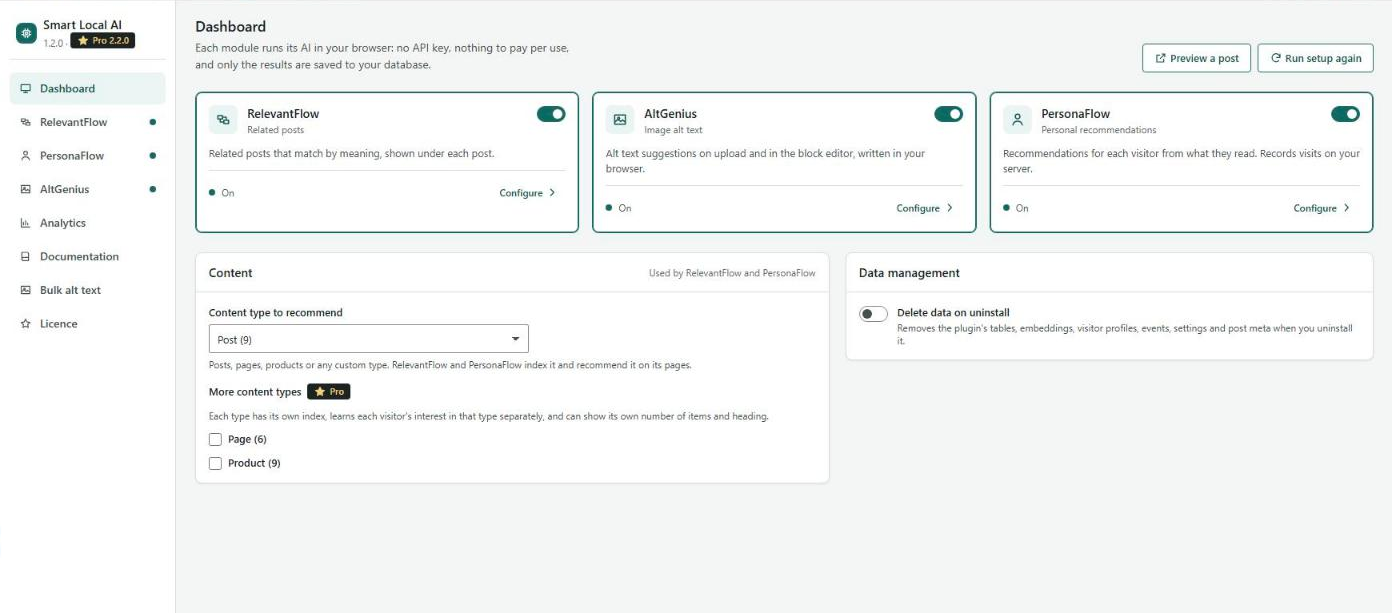
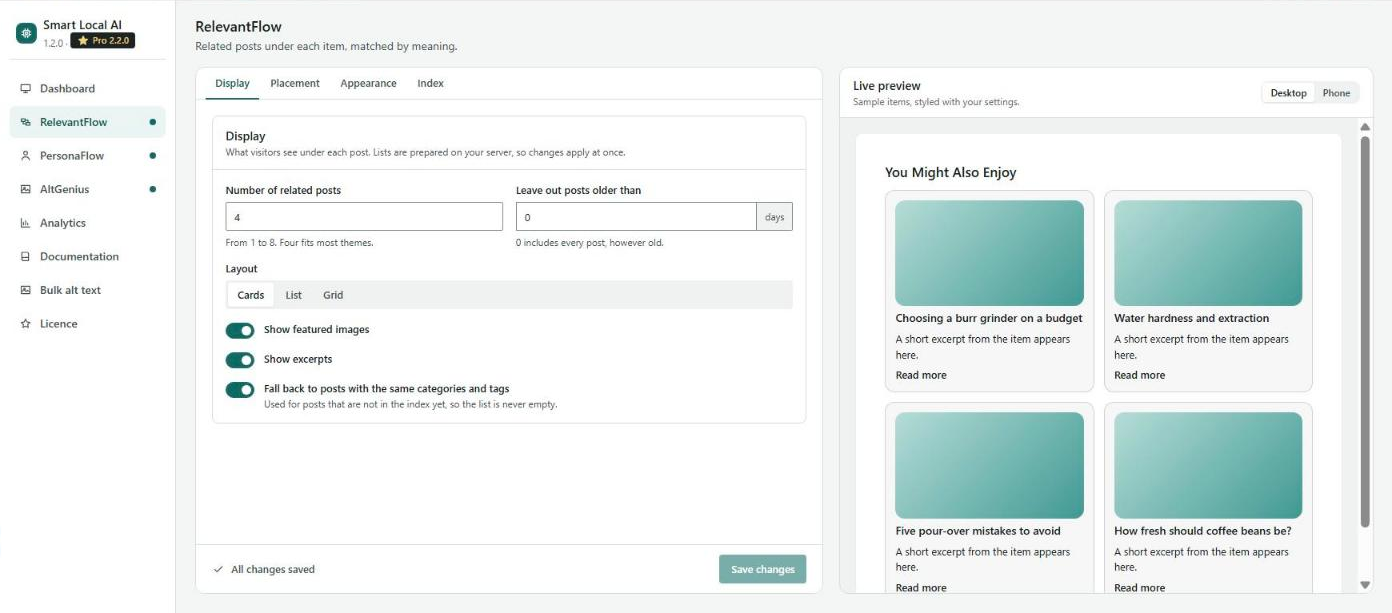
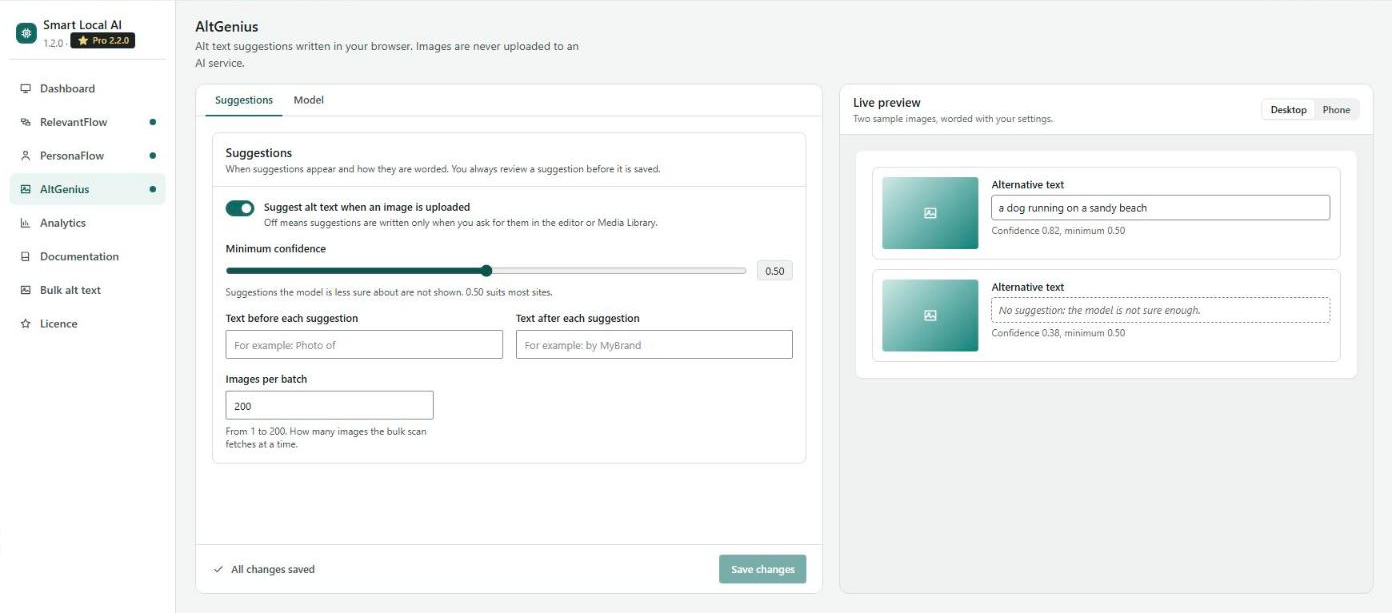
Version 1.2 brings a new app-style settings screen: a menu on the left, short tabs instead of long pages, and a live preview on the right that shows the related-posts widget, the recommendations or an alt-text suggestion exactly as your changes will look, before you save.
At a glance
- Three modules: RelevantFlow (semantic related posts), AltGenius (AI alt text generator) and PersonaFlow (personalized content and product recommendations). Turn each on or off on its own.
- Where the AI runs: in the logged-in editor’s browser, never on your server and never in the cloud. Visitors only receive pre-computed results.
- Any content type: posts, pages, WooCommerce products or any public custom post type. Every page recommends items of its own type, so product pages show products and blog posts show posts.
- Cost: free. No API key, no account, no usage fees.
- Privacy: results are saved in your own WordPress database. PersonaFlow follows your cookie banner through the WP Consent API.
- Works with: block and classic themes, page caching plugins and CDNs, shared hosting, multisite and WordPress Playground.
Who it is for
- Blogs and publishers who want related posts that understand meaning, not just tags
- WooCommerce stores that want « you may also like » product recommendations without sending shopper data to a third party
- Privacy-conscious sites (GDPR, public sector, health, education) that cannot send content to external AI APIs
- Anyone improving image SEO and accessibility with descriptive alt text
- Agencies that need one plugin that works the same on every client site, with no API keys to manage
Why site owners choose Smart Local AI
- No API keys, no subscriptions – zero recurring AI costs, however many posts or images you have
- Private by design – the AI reads your content in your own browser; only small results reach your database
- Works on shared hosting – no Python, no GPU and no AI libraries on the server
- Fast for visitors – lists are prepared in advance and loaded after the page, so they work with page caching
- See it before you save – every display setting has a live preview, with a desktop and phone view
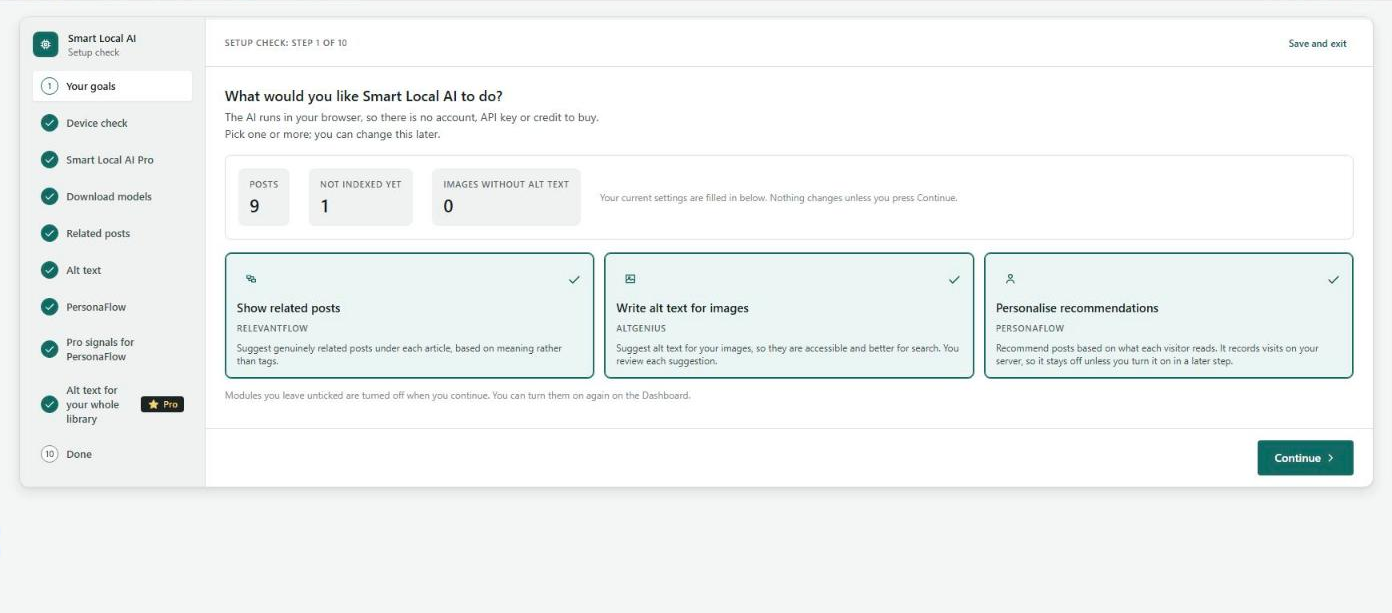
- Guided setup – a setup wizard checks your browser, shows each model’s size before downloading, and lets you try every feature on your own content first
RelevantFlow: semantic related posts
Most related-posts plugins match tags, categories or keywords. RelevantFlow understands meaning. It turns each post into a sentence embedding with the all-MiniLM-L6-v2 model and recommends content that is genuinely similar, even when two posts share no tags at all.
- Semantic similarity instead of keyword overlap: synonyms and related ideas match
- Choose the content type to index: posts, pages, products or a custom post type
- Each page shows items of its own type; switching type keeps the old index, so switching back is instant
- Cards, list or grid layouts, with or without images and excerpts
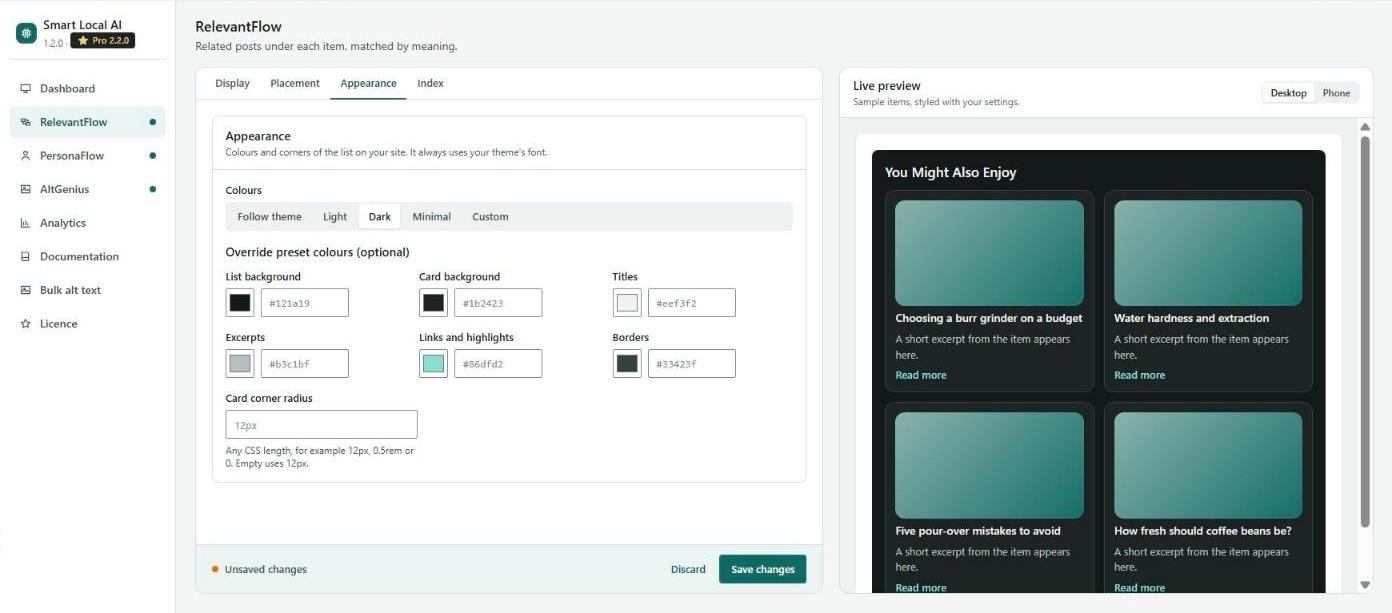
- Colour presets (follow theme, light, dark, minimal) or your own colours and corner radius
- Placed under the content automatically, inside any element with a CSS selector, or anywhere with the
[atlas_ai_relevantflow]shortcode - Leave out old posts, and fall back to shared categories and tags for posts that are not indexed yet
- The index is built in your browser in batches; new and updated posts are flagged for re-indexing automatically
AltGenius: AI alt text generator
Missing alt text hurts image SEO and accessibility (WCAG). AltGenius writes descriptive alt text with an image-captioning model that runs in your browser, so your photos never leave your site.
- Two models: ViT-GPT2 (fast, about 250 MB) or Florence-2 (more detailed, about 460 MB)
- Suggests alt text automatically when you upload an image, or on request in the Media Library
- Block editor panel with a Generate button for every image in a post
- Minimum confidence: suggestions the model is unsure about are not shown
- Optional text before and after each suggestion for consistent, brand-aware wording
- You always review a suggestion before it is saved
- Bulk alt text for the whole Media Library is part of Smart Local AI Pro
PersonaFlow: personalized recommendations
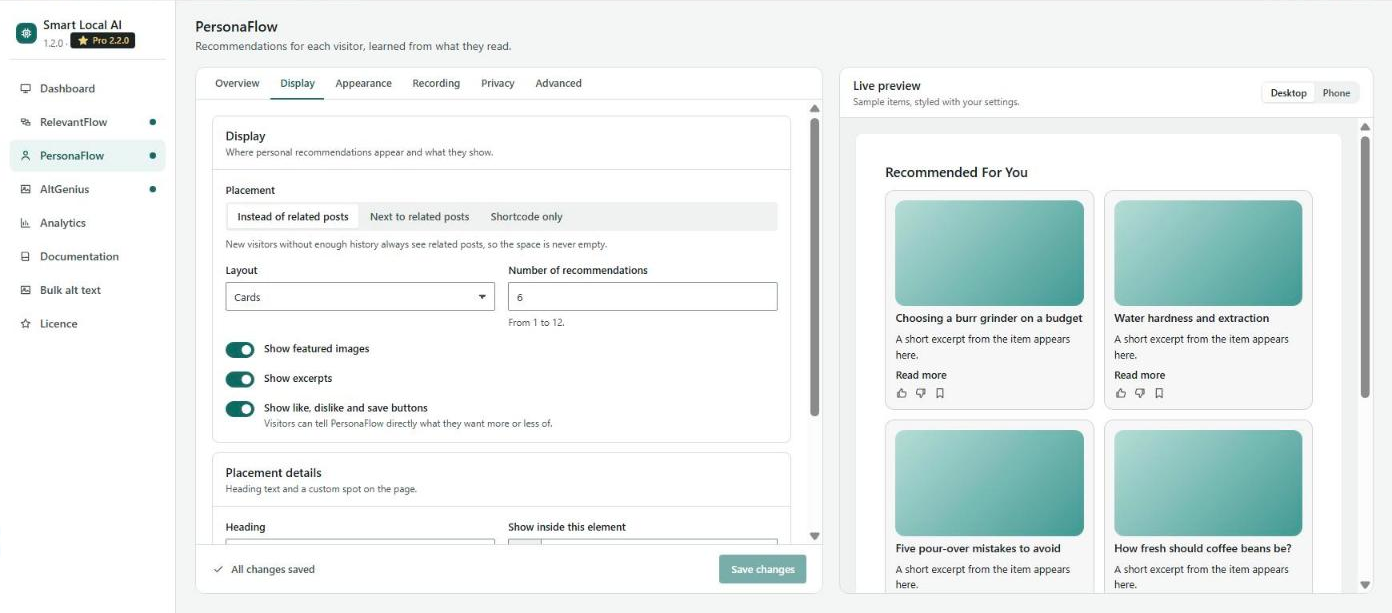
PersonaFlow recommends content to each visitor based on what they actually read, the way streaming services recommend shows. It is off until you turn it on.
- 30 behaviour signals, such as page views, reading time, scroll depth, read completion, site searches, likes, dislikes and bookmarks
- A taste profile for each visitor, computed on your own server from RelevantFlow’s embeddings
- New visitors see related items; personal picks appear after a few signals
- Context-aware: product pages recommend products, articles recommend articles
- WooCommerce signals: product views, add to cart, purchases, reviews and wishlists
- Show recommendations instead of related posts, next to them, or with the
[atlas_ai_personaflow]shortcode - Optional like, dislike and save buttons on every recommendation
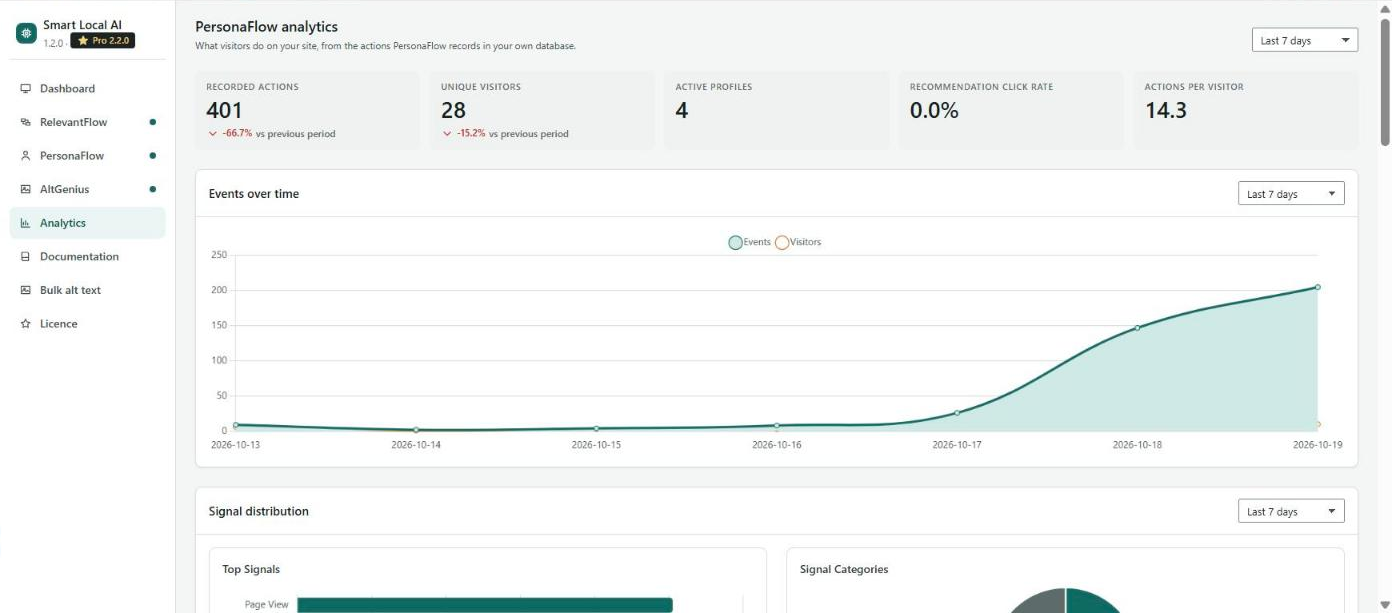
- Analytics for any date range: actions, visitors, signals and the most engaging content
- Data is kept for 90 days by default (you choose) and never leaves your server
Privacy and GDPR
Smart Local AI shows no cookie banner of its own. It works with the one you already have:
- WP Consent API support: with Complianz, CookieYes, Cookiebot, Real Cookie Banner, Cookie Notice or any other consent plugin that supports the free WP Consent API, PersonaFlow records only visitors who allow the category you choose (marketing by default). It starts the moment a visitor accepts and stops, deleting the visitor ID, when they withdraw consent.
- Other consent tools can send one documented browser event, or answer a filter for page views counted by the server.
- Everything is declared: a Consent and privacy screen lists every item PersonaFlow stores, where and for how long. The same list goes into your consent plugin’s cookie declaration and into Settings Privacy Policy guide.
- Data requests: logged-in users’ PersonaFlow data is included in WordPress’s Export Personal Data and Erase Personal Data tools.
- Post text and image pixels used by the AI never leave the editor’s browser. Usage data is sent to us only if an administrator opts in.
Every outside connection is listed under « External services ».
How the on-device AI works
The AI engine (ONNX Runtime for WebAssembly) ships inside the plugin. The open-source models are downloaded from the Hugging Face Hub only when you start the download, in the setup wizard or in a module’s settings:
- RelevantFlow:
Xenova/all-MiniLM-L6-v2, about 23 MB - AltGenius:
Xenova/vit-gpt2-image-captioning, about 250 MB, oronnx-community/Florence-2-base-ft, about 460 MB
The browser keeps each model in its cache after the first download, so it loads instantly next time (this needs HTTPS). WebGPU is used when the browser supports it (Chrome and Edge 113+); otherwise the plugin uses WebAssembly. The work runs in Web Workers, so the editor stays responsive.
Built for AI assistants
Every REST endpoint and setting describes itself. With AtlasMCP, the MCP server for WordPress, assistants such as Claude, ChatGPT or Cursor can check the index, change settings, rebuild related posts or read PersonaFlow analytics, with the same permission checks as the dashboard.
Smart Local AI Pro
Smart Local AI Pro adds:
- Several content types at once, for example blog posts and products, each with its own index, number of items, heading and visitor profile
- Bulk alt text for the whole Media Library
- 77 extra PersonaFlow signals: reactions, star ratings, shares, session context and deeper WooCommerce events
- Visitor controls: hide a post, mute or block an author, dismiss a category
- Extended analytics: engagement funnel, WooCommerce funnel, devices and sessions
Pro plugs into the same settings screen and setup wizard. The free plugin keeps working fully without it. Questions? Contact us.
External Services
This plugin connects to the following external services. Your posts, images and visitor data are never sent to any of them.
Hugging Face Model Hub
AI models are downloaded from the Hugging Face Model Hub (https://huggingface.co/ and its file download servers) by your browser, only when you start a download (in the setup wizard, the module settings, or when you first use a module), and are then kept in the browser’s Cache Storage. Like any download, Hugging Face sees the downloading browser’s IP address. If you enter a Hugging Face access token for Florence-2, it is sent to Hugging Face with the model download. The ONNX Runtime WebAssembly engine that runs the models ships with the plugin and is not downloaded from a CDN. The following models are used:
- RelevantFlow:
Xenova/all-MiniLM-L6-v2(~23 MB) – sentence transformer for content embeddings - AltGenius (ViT-GPT2):
Xenova/vit-gpt2-image-captioning(~250 MB) – image captioning model - AltGenius (Florence-2):
onnx-community/Florence-2-base-ft(~460 MB) – detailed image captioning model
These models are open source (Apache 2.0 or MIT). No user content, images or site data is uploaded to Hugging Face; the connection is download-only.
AtlasAiDev plugin list and WordPress.org plugin information
When an administrator opens Smart Local AI > Plugins, your server downloads the list of AtlasAiDev plugins from GitHub (https://raw.githubusercontent.com/atlasaidev/plugins/main/plugins.json) and their ratings and install counts from the WordPress.org Plugins API (https://api.wordpress.org/plugins/info/1.2/). Both are cached for 24 hours. No site data is sent.
AtlasAiDev promotions (opt-in only)
Only if an administrator has opted in to AtlasAiDev usage data (see below), your server checks a small JSON file on GitHub Gist (https://gist.githubusercontent.com/) for current AtlasAiDev offers, at most every 12 hours, and shows them as dismissible notices to administrators. No site data is sent. Without opt-in this file is never requested.
AtlasAiDev usage data (opt-in only)
Only if an administrator opts in (on the last step of the setup wizard, or in the admin notice), your server sends non-sensitive usage data once a week to AtlasAiDev (https://track.atlasaidev.com/): WordPress, PHP and plugin versions, which modules are enabled, content counts and setup progress. To include the site’s public IP address in this report it calls https://icanhazip.com/. Nothing is sent without opt-in, and you can opt out at any time.
Screenshots


Installation
From the WordPress plugin directory
- Go to Plugins > Add New and search for « Smart Local AI »
- Click Install Now, then Activate
Manual installation
- Download the plugin zip file
- Go to Plugins > Add New > Upload Plugin, upload the zip and click Install Now
- Activate the plugin
First run: the setup wizard
Open Smart Local AI in the admin menu. On a new site the setup wizard opens by itself; on a site that already used the plugin you get a short setup check instead, and nothing changes unless you save a step. The wizard walks you through:
- Your goals – related posts, alt text, personalization, or all three
- Device check – whether your browser can use WebGPU or WebAssembly, and whether the site is on HTTPS
- AI models – the size and source of each model, then the download, with progress, Cancel and Resume
- Related posts – indexes your latest content in your browser and previews the result on a real post
- Alt text – writes alt text for one of your images so you can judge the quality before saving
- PersonaFlow – explains what it records and lets you switch it on
- Finish – a summary, an optional usage-data opt-in (off unless you tick it) and a link to your first post
You can skip any step, close the wizard at any time, and run it again with Run setup again on the Dashboard.
Day-to-day use
The settings screen has a menu on the left: Dashboard, RelevantFlow, PersonaFlow, AltGenius, Analytics and Documentation. Each screen has short tabs, a live preview on the right and one Save bar at the bottom (Ctrl+S also saves).
- Content type: choose it on the Dashboard. A new type needs its index built; the old index is kept.
- RelevantFlow: build or refresh the index under RelevantFlow Index. You need at least two published items of the chosen type. Related items appear as soon as the index is built.
- AltGenius: upload an image and the alt text is suggested automatically, or use the AltGenius panel in the block editor.
- PersonaFlow: turn it on from the Dashboard, then set the consent category under PersonaFlow Privacy if your site uses a cookie banner.
Requirements
- WordPress 6.2 or higher, PHP 7.4 or higher
- For the person who runs the AI: a modern browser with WebAssembly (Chrome 80+, Firefox 78+, Safari 15+, Edge 80+); WebGPU (Chrome or Edge 113+) is faster
- HTTPS on the admin side, so the browser can keep the downloaded models
- Visitors need nothing special: they only receive pre-computed results
FAQ
-
What is Smart Local AI?
-
Smart Local AI is a free WordPress plugin that adds AI features without cloud APIs. It runs open-source machine learning models in the browser (on-device AI) to produce semantic related posts, image alt text and personalized recommendations, and stores only the results in your WordPress database. It is made by AtlasAiDev and has a Pro add-on.
-
Do I need an OpenAI, Google or other API key?
-
No. Smart Local AI does not call any cloud AI service. There is nothing to sign up for and no usage bill.
-
Is it a free alternative to AI plugins that need an OpenAI key?
-
For related posts, alt text and on-site personalization, yes: those features run locally and cost nothing per use. It does not write blog posts or chat; it focuses on recommendations, accessibility and personalization.
-
Does Smart Local AI send my content or images anywhere?
-
No. Posts are embedded and images are captioned in the browser of the editor who runs the task; only the result is saved to your database. The only AI-related outside request is the one-time model download from Hugging Face, which you start yourself. Every outside connection is listed under « External services ».
-
Where does the AI actually run?
-
In the browser of the logged-in user who triggers it: the editor building the index, uploading an image or running the setup wizard. Visitors never download a model. They see related items and recommendations that were computed earlier and stored on your server.
-
Which AI models does it use?
-
RelevantFlow uses the sentence-transformer all-MiniLM-L6-v2 (about 23 MB). AltGenius uses ViT-GPT2 image captioning (about 250 MB) or Florence-2 base (about 460 MB) for more detailed alt text. All are open-source models from the Hugging Face Hub, run with Transformers.js and ONNX Runtime Web.
-
How big are the models and how long does the download take?
-
About 23 MB for related posts, 250 MB for the fast alt-text model and 460 MB for the detailed one. Each downloads once per browser, usually in one to two minutes, with a progress bar. On HTTPS sites the browser keeps the model, so later loads are instant.
-
Will it slow down my website?
-
No. The AI runs in the admin’s browser, never on the server and never for visitors. Visitors load small scripts and pre-computed lists after the page has loaded. PersonaFlow’s taste profiles are calculated on your server by scheduled tasks and cached per visitor.
-
Does it work with WooCommerce products and custom post types?
-
Yes. Choose the content type on the Dashboard: posts, pages, WooCommerce products or any public custom post type. Each page recommends items of its own type, so product pages show products. The free plugin indexes one type at a time; when you switch, the old index is kept, so switching back needs no rebuild.
-
Can I recommend blog posts and products at the same time?
-
Yes, with Smart Local AI Pro. It adds more content types next to the one you chose. Each type gets its own index, its own number of items and heading, and learns each visitor’s interest in that type separately, so reading blog posts does not steer product recommendations.
-
Tag-based plugins can only connect posts that share labels or words. RelevantFlow compares the meaning of the text with a sentence-transformer model, so an article about « espresso grind size » can be related to one about « brewing better coffee at home » with no tags in common. Lists are prepared in advance, so the front end stays fast.
-
Yes. The settings screens show a live preview next to the settings. It follows the layout, number of items, images, excerpts, heading and colours as you change them, with a desktop and a phone view. Nothing reaches your site until you click Save.
-
How does PersonaFlow personalization work, and what does it store?
-
PersonaFlow records behaviour signals such as page views, scroll depth, reading time, site searches and, with WooCommerce, product views and purchases. They are stored in your own WordPress database. Visitors who are not logged in get a random visitor ID in their browser (plus a one-way hash of IP address and browser for page views counted by the server; the IP address itself is not stored); logged-in users are linked to their account. A taste profile per visitor is computed on your server to rank your content. Events are deleted after 90 days by default. Nothing is sent to us or to any third party. PersonaFlow is off until you turn it on.
-
PersonaFlow sets no cookies, but it stores a visitor ID in the browser and records behaviour on your server, so in many countries it needs consent. Smart Local AI shows no banner of its own. Install the free WP Consent API plugin next to your cookie banner and choose the consent category under PersonaFlow Privacy; PersonaFlow then records only visitors who agreed. For consent tools without the WP Consent API, turn on « Wait for a consent signal » and follow Documentation Privacy and consent.
-
Any consent plugin that supports the WP Consent API, including Complianz, CookieYes, Cookiebot, Real Cookie Banner and Cookie Notice. PersonaFlow’s data also appears in their cookie declaration. Other tools can connect with one browser event or a PHP filter, both shown under Documentation Privacy and consent.
-
What happens to existing data when a visitor withdraws consent?
-
Tracking stops at once and the visitor ID is deleted from their browser. Data recorded earlier is removed by the daily cleanup when its retention period ends; for logged-in users you can erase it straight away with Tools Erase Personal Data.
-
Is it compatible with caching plugins?
-
Yes. Related items and recommendations are fetched by the browser after the page loads, and PersonaFlow’s tracker runs in the browser, so pages served from WP Super Cache, W3 Total Cache, LiteSpeed Cache or a CDN still work and are still counted.
-
Can I change how the lists look and where they appear?
-
Yes. Choose cards, list or grid; images and excerpts on or off; a colour preset or your own colours and corner radius; and your own heading. Lists appear under the content by default, inside any element with a CSS selector, or anywhere with the
[atlas_ai_relevantflow]and[atlas_ai_personaflow]shortcodes (attributes:num,template,heading). -
Is bulk alt text included in the free version?
-
Alt text on upload and in the block editor is free. Scanning the whole Media Library and fixing all missing alt text in one run is part of Smart Local AI Pro.
-
Can an AI assistant like Claude or ChatGPT manage the plugin?
-
Yes, through AtlasMCP, the MCP server for WordPress. Smart Local AI’s REST endpoints and settings describe themselves, so AtlasMCP can expose them as tools: check the index, change settings, flag posts for re-indexing, read PersonaFlow analytics and more, with the same permission checks as the dashboard.
-
What happens if JavaScript is disabled?
-
The related-posts block, recommendations and alt-text tools simply do not appear. Your site keeps working normally.
-
Where do I report security bugs found in this plugin?
-
Please report security bugs found in the source code of the Smart Local AI – Related Posts, AI Alt Text & Personalized Recommendations plugin through the Patchstack Vulnerability Disclosure Program. The Patchstack team will assist you with verification, CVE assignment, and notify the developers of this plugin.
Reviews
There are no reviews for this plugin.
Contributors & Developers
“Smart Local AI – Related Posts, AI Alt Text & Personalized Recommendations” is open source software. The following people have contributed to this plugin.
Contributors
Interested in development?
Browse the code, check out the SVN repository, or subscribe to the development log by RSS.
Changelog
1.2.0 (19 Oct 2026)
- New: A redesigned settings screen that works like an app: a menu on the left, each screen split into short tabs, and a live preview on the right that shows your changes as you make them
- New: One Save bar on every screen, with Discard, a Ctrl+S shortcut and a warning before you leave with unsaved changes
- New: Choose the content type to recommend from a list: posts, pages, WooCommerce products or any custom type. Every page recommends items of its own type, so product pages show products and blog posts show posts
- New: PersonaFlow follows your cookie banner. With a consent plugin that supports the WP Consent API (Complianz, CookieYes, Cookiebot, Real Cookie Banner, Cookie Notice and others) it records only visitors who agree, and forgets them when they withdraw consent
- New: A Consent and privacy screen lists everything PersonaFlow stores and for how long. The same list appears in your consent plugin and in Settings Privacy Policy guide
- New: Logged-in users’ PersonaFlow data is included in WordPress’s Export and Erase Personal Data tools
- Improvement: Switching to another content type keeps the old index, so switching back needs no rebuild
- Improvement: A refreshed look for the setup wizard, the block editor panel, the Media Library and the related-post widgets on your site
- Improvement: Notices about other AtlasAiDev plugins only appear after you agree to share usage data
- Fix: Related posts and personal recommendations keep working on pages served from a page cache for more than a day
- Fix: Titles with dashes or curly quotes now show those characters in related posts and recommendations, instead of HTML codes
- Fix: The AltGenius « Images per batch » setting now accepts up to 200, matching its default
- Change: Requires WordPress 6.2 or later
1.1.2 (16 Oct 2026)
- Improvement: Every Smart Local AI REST endpoint and setting now describes itself, so AI assistants connected through AtlasMCP (or any MCP server built on the WordPress Abilities API) can discover and use RelevantFlow, AltGenius and PersonaFlow as tools. Nothing changes in what the endpoints do or accept.
- Improvement: Rewritten plugin description, installation guide and FAQ so they match how the plugin works today (setup wizard, model sizes, what PersonaFlow stores, which features are Pro)
1.1.1 (8 Oct 2026)
- Fix: Related posts work again on WordPress Playground and other sites that use SQLite
1.1.0 (8 Oct 2026)
- New: A setup wizard opens on your first visit. It checks what your browser can run, shows the size and source of each AI model before anything is downloaded, and lets you try related posts and alt text on your own content before anything is saved
- New: Download progress for AI models, with Cancel and Resume
- New: Sites that already use Smart Local AI get an optional setup check instead of the first-run wizard; nothing changes unless you save a step
- New: Option to share anonymous usage data on the last step of the setup (off unless you tick it)
- Improvement: No more automatic redirect after activating the plugin
- Improvement: The AI engine now loads from the plugin itself instead of a third-party CDN
- Improvement: The readme now explains exactly what PersonaFlow stores and lists every outside service the plugin contacts
- Improvement: Admin screens can now be translated
- Improvement: The dashboard header shows the Pro version when Smart Local AI Pro is installed
- Fix: Users can only change the alt text of images they are allowed to edit
- Fix: The « Run Setup Wizard » link no longer resets anything by itself
- Fix: Related posts now appear as soon as the index is built (before, they could stay hidden for up to six hours)
- Fix: Every post now gets its full list of related posts, including posts indexed after it (before, the first posts indexed could show few or none). Existing lists are rebuilt automatically in the background after the update
- Fix: « Reset plugin » now also restarts the setup wizard and clears cached related posts
- Fix: PersonaFlow now records the extra signals added by Smart Local AI Pro (such as hides, dislikes and shares)
- Fix: Posts a visitor hides no longer come back in their recommendations, also for new visitors and right after hiding
- Fix: PersonaFlow no longer counts a first visit to a post as a return visit
- Fix: Password-protected posts are no longer shown in related or recommended post lists
- Improvement: Personal recommendations are now cached per visitor, so pages load faster
- Improvement: Cleaner alt text suggestions (no more repeated words like « a hat hat »)
- Improvement: On block themes, related and recommended posts now line up with the post content
- Improvement: Improved input checks and escaping
- Improvement: Tested up to WordPress 7.1
- Tidy-up: Removed unused leftover files
1.0.6 (10 Apr 2026)
- New: Plugins page — discover and install other AtlasAiDev plugins
- New: Plugin data fetched remotely with 24-hour caching
- New: WP.org star ratings and active install counts
- New: Plugin icons, NEW/PRO/RECOMMENDED badges
- New: Go Pro and Configure buttons
- New: Google Analytics UTM parameters on outbound links
- Improvement: Tested up to WordPress 7.0
1.0.5
- New: Content type selection — choose which post type (Posts, Pages, Products, or any custom type) RelevantFlow indexes and recommends
- New: Setup wizard — guided 5-step onboarding walks you through enabling modules, selecting content type, building the index, and previewing recommendations
- New: Automatic redirect to the plugin dashboard after activation so you can start setup immediately
- New: Content Type selector card on the Dashboard for quick post type switching
- New: Upgrade & Support banner on the Dashboard with links to Pro and contact
- Improvement: RelevantFlow now fully supports custom post types across all queries (embeddings, stats, indexing, cron, similar posts, and frontend display)
- Improvement: Setup wizard includes post preview on the finish screen
- Improvement: PersonaFlow step in the wizard works as a toggle — enable or disable and proceed
- Improvement: Developer Tools description updated to reflect all data cleared on reset
- Fix: AltGenius Bulk Scan Pro upgrade link pointed to wrong URL
1.0.4
- Fix: Similar posts table fails to create on SQLite/WordPress Playground —
rankcolumn renamed tosort_rank(reserved keyword) - Fix: RelevantFlow similar posts table now lazily created on first use if activation fails
- Improvement: Full SQLite and MySQL compatibility for all database operations
- Improvement: Existing MySQL installs with old
rankcolumn automatically migrated on upgrade
1.0.3
- Fix: Admin dashboard crash on WordPress Playground — wp.apiFetch not loaded (missing wp-api-fetch dependency)
- Fix: AltGenius editor panel and media upload scripts missing WordPress script dependencies
- Improvement: All admin script enqueues now explicitly declare required WordPress globals alongside build-generated dependencies
1.0.2
- Fix: Admin UI failed to load on WordPress Playground and older WP versions (wp-element dependency missing)
- Fix: Plugin activation crash when AtlasAiDev library files were missing
- Fix: Fatal error from hardcoded text-to-audio constant in AtlasAiDev Insights library
- Improvement: WordPress Playground blueprint now creates demo content with 10 posts across 2 categories
- Improvement: Blueprint uses MU plugin approach for reliable demo setup
- Improvement: Opt-in telemetry now collects plugin-specific usage metrics (module enablement, settings, content counts)
1.0.0
- Initial release with RelevantFlow, PersonaFlow, and AltGenius modules